Automend Pro OBD 2 Car Scanner
WowSuite SoftwareAuto & Vehicles
3.350.00 Reviews
- Version
- 1.3.39
- Installs
- 100.00K
- Age Rating
- Everyone
Screenshots
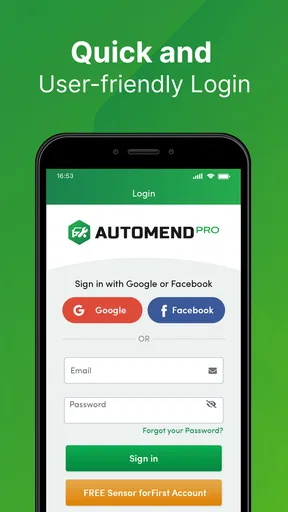
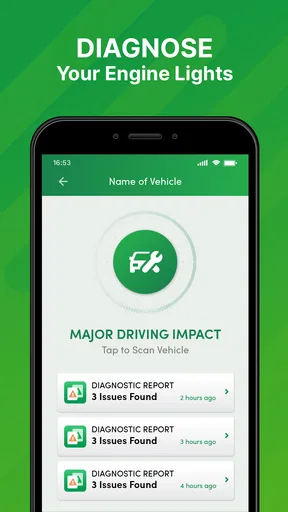
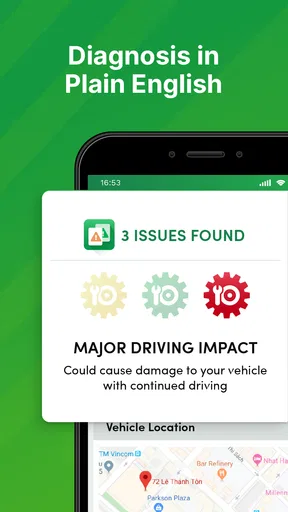
Our Review of Automend Pro OBD 2 Car Scanner
 Analysis by Appyee
When a warning light appears while several people rely on the same car, the first problem is often not the repair itself but figuring out what the vehicle is trying to say. I see Automend Pro OBD 2 Car Scanner as a useful starting point for that conversation: it can help turn a vague dashboard warning into information the household can discuss before anyone books a garage visit. It is an Auto & Vehicles app from WowSuite Software, and its appeal is less about replacing a mechanic than helping drivers approach one with a clearer question.
One car, several drivers
A shared vehicle makes basic diagnostic information more valuable. One person may notice a warning on the school run, another may use the car for work, and the person arranging maintenance may not have been present when the symptom first appeared. A scan can give the household a common reference point, rather than leaving everyone to pass along an uncertain description of a light or sound.
That does not mean the app can coordinate drivers by itself. I would treat it as a tool for whoever is handling the check: agree who will connect the scanner, record what the app reports, and pass that information to the person responsible for the car. Keeping notes about when a warning appeared and what the driver noticed can make the results more useful, especially if the issue is intermittent.
Make the scan a deliberate handoff
On a shared phone or a phone belonging to another household member, I would decide in advance who is going to install and use the app. That avoids the confusing situation where one driver has the scan result but the person speaking to the mechanic cannot find it. If multiple drivers use separate phones, agree on a simple handoff—such as sharing the reported code and the circumstances in which it appeared—rather than assuming the app will keep everyone in sync.
There is also a practical order to follow: park safely, locate the vehicle’s OBD2 port, connect the scanner, and then use the app to read the result. I would not ask someone to troubleshoot the connection while driving, or make a scan at the roadside in an unsafe place. If the warning comes with serious symptoms, such as a loss of power or unusual noises, the priority is dealing with the vehicle safely, not getting a more convenient reading.
Who benefits—and who may prefer another route
This setup suits drivers who want a first look at a warning before deciding what to do next, and households where the person maintaining the car is not always the person driving it. It can also help a less experienced owner arrive at a repair conversation with a code to discuss instead of relying only on a dashboard symbol. The app is free to download, with in-app purchases listed at $9.99 per item, so I would check the purchase details in the app before assuming every function is included at no cost.
It is not the right choice for someone who needs a guaranteed diagnosis, a professional workshop tool, or a remote service that automatically watches the vehicle. A basic code reader can be a more direct option if all you want is to retrieve a code and you are comfortable looking up what it means. A mechanic is the better next step when the car behaves abnormally, the result is unclear, or a repair decision depends on testing beyond a code scan. The useful distinction is that this app can inform a decision; it cannot make the decision safe on its own.
First Impressions and Setup
Right out of the box, the Automend Pro OBD 2 Car Scanner feels like a quality piece of kit. It's compact and sleek, which is perfect for storing in your glove compartment. Setting it up is a breeze, even for a tech newbie like me. You simply plug it into your car's OBD2 port—usually found under the dashboard—and you're good to go. No fuss, no muss.
Connecting to the App
Once plugged in, you need to connect it to the Automend Pro app on your smartphone. The app is available for both Android and iOS, so no worries about compatibility. The connection is via Bluetooth, and I was pleasantly surprised by how smoothly it paired with my phone. Just a few taps, and I was ready to diagnose my car's issues.
User-Friendly Interface
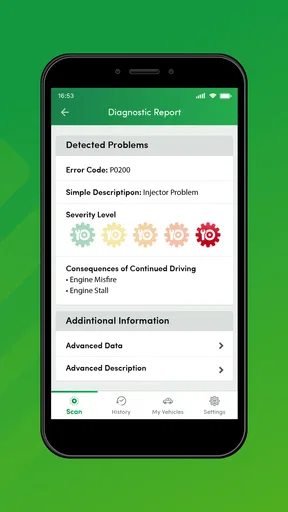
The app itself is pretty intuitive. It’s designed with a simple interface, allowing you to navigate through its features without feeling overwhelmed. For someone like me who can barely change a tire, this is a major plus. The app provides real-time diagnostics, showing you exactly what's going on with your vehicle.
Diagnostics and Features
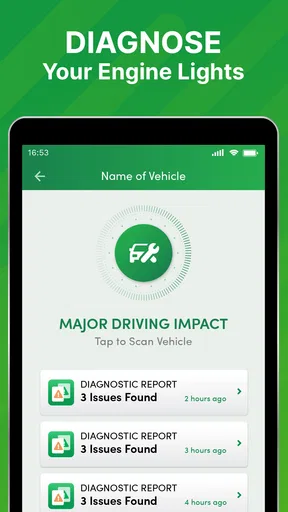
Here’s where the Automend Pro really shines. It scans your car for issues and gives you detailed reports on any detected problems. The app breaks down complex codes into understandable terms, so you know whether you need to rush to a mechanic or if it’s something minor. I tested it on my friend’s car, and it identified a faulty oxygen sensor, which turned out to be spot-on.
Beyond diagnostics, the app offers maintenance reminders and tracks your driving habits. This feature is particularly cool because it helps you optimize fuel efficiency and monitor your car's overall health.
Use the reading as a lead, not a verdict
A code is most helpful when I connect it to what the driver experienced. If a warning comes on during a particular trip, I would note the conditions and whether the car felt different, then compare that account with the scan. This small habit gives a mechanic more context and helps prevent a family member from treating a plain-language explanation as proof that a specific part must be replaced.
For an intermittent warning, timing matters. If the light disappears before anyone connects the scanner, a later scan may not answer the same question as a reading taken while the warning is present. I would scan promptly when it is safe and keep the result with the driver’s observations. That is a more reliable household workflow than waiting until several people have driven the car and their recollections have blurred together.
The maintenance reminders and driving-habit tracking can be useful for the person who wants to keep an eye on routine ownership, but I would still follow the vehicle’s own maintenance guidance and keep service records separately. An app reminder is a prompt, not evidence that work has been completed. In a shared household, naming who is responsible for logging a service or checking a reminder avoids the common gap where everyone assumes someone else handled it.
Age, access, and trust
The app has an Everyone content rating, which makes it broadly suitable for general audiences, but that rating is not a reason to hand a child responsibility for diagnosing or handling a car. I would keep vehicle decisions with an adult who understands the limits of an OBD scan. Younger household members can help relay what they noticed as passengers, while an adult handles the connector, phone, and any decision about driving or repairs.
For a family sharing a device, the main boundary is practical rather than technical: the person using the phone should know whether they are only reading a report or are also entering any paid area. Because in-app purchases are available, I would check before tapping through a purchase screen and keep the household’s usual device-purchase rules in place. There is no need to make assumptions about family-sharing tools; a clear agreement about who uses the app and who approves spending is enough to prevent surprises.
Automend Pro has a 3.2 average from 339 ratings, with 48 written reviews, so I would approach it as a handy aid rather than an unquestionable authority. That matters in a shared car: one person may be reassured by a simple explanation while another wants a professional check. Treating the result as a starting point keeps the conversation grounded and avoids using an app reading to overrule a mechanic’s inspection or the driver’s experience of a serious fault.
Peace of Mind
One of the standout benefits of using the Automend Pro OBD 2 Car Scanner is the peace of mind it provides. Instead of dreading a trip to the mechanic, you can have an idea of what’s up before you even leave your driveway. It’s like having a mini mechanic in your pocket, and honestly, who wouldn’t want that?
Where it fits among the alternatives
Compared with a quick search for a dashboard warning, a scan can give you a vehicle-specific code to discuss, which is a more useful starting point than matching a symbol to a list of possible causes. Compared with visiting a garage immediately, it may help you explain the concern and ask more focused questions. But a search, a code reader, and a workshop inspection each serve different purposes: the app is most valuable when it helps bridge the gap between noticing a problem and deciding what kind of help is needed.
It is also worth being realistic about compatibility and connection. OBD2 access depends on the car having a suitable port and the scanner being able to communicate with that vehicle; a smooth Bluetooth pairing with a phone does not guarantee that every car will expose every kind of information. If a scan does not connect or the result does not make sense, I would avoid repeatedly guessing at settings or buying parts based on an uncertain interpretation. Check the vehicle and scanner instructions, then seek help if the warning is important.
The app is listed for Android with a minimum OS requirement of 5.0, and the current version is 1.3.39. It was released on Oct 25, 2019, and has over 50,000 installs. Those details make it easy to judge whether an older Android phone may meet the stated baseline, but they do not change the main practical test: whether the phone, scanner, and particular vehicle work together in the situation you need. The app is free, while individual in-app items have a listed price of $9.99 each.
My Final Thoughts
After a few weeks of using the Automend Pro OBD 2 Car Scanner, I’m convinced it’s a must-have for all car owners. Whether you’re a DIY enthusiast or someone who prefers to leave car maintenance to the pros, this device offers valuable insights into your vehicle’s condition.
It’s affordable, easy to use, and most importantly, delivers on its promises. If you’ve ever felt at a loss with car issues, this scanner might just be the solution you need.
In a world where our lives are increasingly dependent on technology, it’s comforting to know that tools like the Automend Pro exist to make our lives a bit easier. Give it a try, and you might just wonder how you ever lived without it.
My household verdict
For a household with one car and several drivers, I like the idea of having a clear first step when a warning appears, as long as one adult takes responsibility for interpreting and sharing the result. It is especially helpful for people who want to be better prepared for a garage conversation without pretending they can diagnose every fault themselves. I would skip it if I wanted a professional-grade diagnostic system, or if I expected an app to coordinate several users automatically.
My practical recommendation is to keep the scanner with the car, decide who will run a scan, and write down the code alongside what the driver noticed. Use the reading to ask better questions, not to postpone urgent help or approve a repair without proper confirmation. That balance is where this tool makes the most sense: it gives an ordinary driver a more informed starting point while leaving safety-critical judgment where it belongs.
Verdict
Strengths of Automend Pro OBD 2 Car Scanner
- Easy-to-use interface for all users.
- Compatible with most car models.
- Real-time vehicle diagnostics.
- Affordable compared to similar devices.
- Provides detailed maintenance reports.
Limitations of Automend Pro OBD 2 Car Scanner
- Requires smartphone for full functionality.
- No direct support for diesel engines.
- Limited features without premium subscription.
- Bluetooth connectivity can be spotty.
- May not work with older car models.
Similar Picks in This Category
View All
Android Auto
Google LLC4.1

maxim — order a taxi & food
PT. SITO4.7

Штрафы ГИБДД: проверка с фото
Pays LLC – Штрафы ГИБДД4.7

Номерограм – проверка авто
Авто Ассист4.8

Дром Авто
Дром4.9

Frequently Asked Questions
What is Automend Pro OBD 2 Car Scanner?
Automend Pro OBD 2 Car Scanner is a diagnostic tool designed for cars. It connects to your vehicle’s onboard diagnostics (OBD) port and provides real-time data on engine performance, error codes, and other key metrics. It's a user-friendly app for both Android and iOS, ideal for car enthusiasts and everyday drivers looking to maintain their vehicles.
How does Automend Pro work with my smartphone?
Automend Pro connects to your smartphone via Bluetooth. Once plugged into your car’s OBD port, it pairs with the Automend Pro app, available for both Android and iOS. This connection allows the app to display diagnostic information directly on your phone, making it easier to monitor your car’s health.
Is Automend Pro compatible with all car models?
Automend Pro is compatible with most vehicles manufactured after 1996, as these models generally have the standard OBD 2 port. However, it’s always best to check your car's specifications or consult the app’s compatibility list to ensure it will work seamlessly with your specific vehicle model.
What features does Automend Pro offer?
Automend Pro offers a range of features including real-time diagnostics, error code reading and clearing, fuel efficiency tracking, and maintenance reminders. It provides detailed reports on engine performance and alerts you to potential issues, helping you keep your car in optimal condition and avoid costly repairs.
Are there any subscription fees for using Automend Pro?
Automend Pro typically offers a one-time purchase for the device itself. While the basic app features are free, there might be optional premium features or services available through in-app purchases or subscriptions. It's advisable to check the app store listing for the latest pricing details and any available packages.
